This week we addressed the fact that, by default, Azure only allows you to allocate 10 vCores per region. Each Container Instance needs one or more vCores, making it limiting the number of Container Instances we spin up.
Another issue with the original architecture is that whenever we start a Container Instance, with the desktop app, it isn’t removed when the app is done, it’s just idle, still having the resources allocated. This isn’t a cost issue, since idle resources are free of charge, but with the resources being limited by number, it’s a big issue.
We will be designing a system that handles Container Instances that are no longer running. How that will be designed is yet to be decided.
In the original architecture (A), each click in the frontend application starts a new Container Instance. This is great for scalability. Since all the Instances write to the same database (at least for now), this might cause heavy load. Also, there’s the 10 vCore limit, and the current implementation just fails to start an Instance, with no error handling. This could of course be handled with decent error handling and increasing the vCore limit, but I hade another idea.

The improved architecture (B) has a Queue, where the instructions for the Crawl is put. We also create a new Container Manager, that will read the Queue only when a new Container Instance can be created. This minimize the risk of Crawl requests being dropped. We can also control the number of Container Instances being created, to avoid heavy load on the database.
We also have stressors indicating that the maximum number of concurrent crawls per Agency might be set by their license. Other stressors suggest DDos attacks, and tho this whole flow is behind login, in architecture A, a user might still cause chaos.

In total, the Residuality Index for architecture B is 0,06. A positive number indicates that the architecture is better than the baseline (architecture A).
We have a central flow in the system, the generate report flow, that’s quite interesting from an architectural perspective. The report is generated in the desktop application given to us, and using a Windows desktop application in a Cloud environment is, let’s say interesting.
I’ve designed three different versions of the flow, calling them A, B and C, and then using the stressor analysis to calculate the Residual Index. I removed lots of the stressors that I’m certain will not have any impact on this specific flow.

I know, I’m mixing Swedish and English. Sorry not sorry. But here we see Flow A where a frontend-click calls an Azure Function that triggers a Windows Container to start, with the desktop application in it. Parameters are passed down using Environment Variables, and the desktop application calls the database to get information and uses Libre Office to generate a PDF-report, that is saved in an Azure Blob Storage. The Blob Storage triggers a function to update the database when the file is stored. This is the current flow, and our main issue is that the Windows Container takes 3-5 minutes to start.
Flow B has a Queue where the Azure Function puts the parameters for the report, and a Container always running and subscribing to that Queue to generate the reports in the exact same way as in Flow A. The main win here is that we get rid of the startup time of the Container. We can still have more Containers running to scale, based on Queue length or something, making it equally scalable, but faster.
There’s also a Flow C, where we rewrite the Report Generator to run without the need of the Desktop Application. Using Azure Functions is giving us Auto Scale, and this flow would allow direct response to the user, without the Fire & Forget flow as in A and B. This will also allow us to remove the dependence on Libre Office and instead use a Word to Pdf component that’s made for using in code.
Here’s the Residual Index calculation

The main benefit using Flow C is the reduced dependency on our external developer (called main developer in the Stressor Analysis). He’s great, but him being alone and no one else having access to the code is a risk.
Cost wise, Flow A has cost for multiple Containers running, where Flow B has cost for Container always on. Is one of them to prefer? We can’t tell until we see consumer behavior. As for Flow C, rewriting stuff always come with a cost, and possibly also a licensing cost. However, decisions regarding cost will come at a later stage.
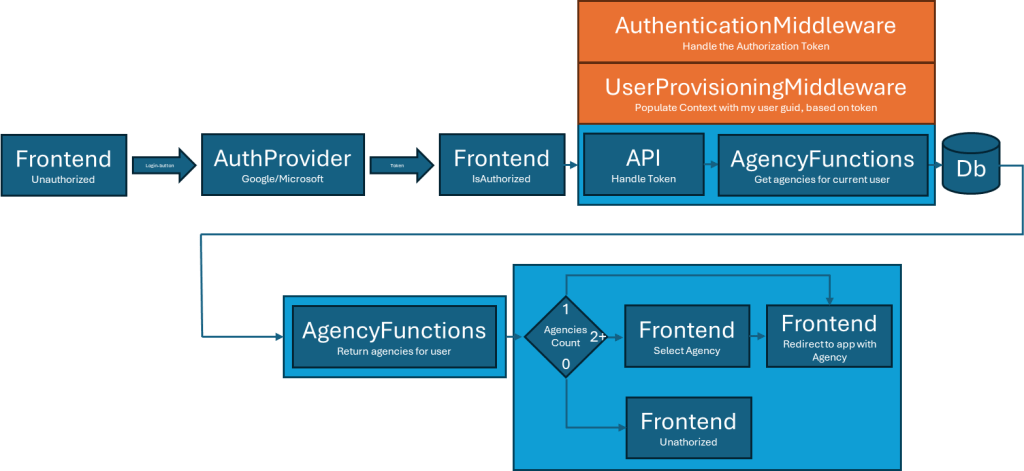
So I’ve started drawing some flows with more detail. First out is the login flow. We needed this because we started talking about what would happen if one User would need access to more than one Agency. With the decision based on Agencies Count, I got some UX design included in the architecture. We do not want to show a list of only one Agency, that’s typical bad UX.
The AuthenticationMiddleware intercepts all API calls, and checks if Authentication is required, and if so, it validates the Bearer token, and sets the claims to the Context.

The UserProvisioningMiddleware intercepts all API calls and, if we have Claims in the Context, makes sure the current users local Identifier is set to the Context, for use in calls to the database, for permission control.

One thing that I’m having a bit of trouble handling is that the development of the application is faster than my architectural work. This means there’s part of the application that has accidental architecture. The accidental architecture isn’t necessarily bad, but it lacks the comparison to the naive architecture, i.e. not scientifically proven.
I’m not sure if I should use the accidental architecture as the base line, but I guess I could do that.
The title of this post is “More stressors”, since I’ve already done an initial Stressor analysis. I’ve realized two things, the initial stressors aren’t random enough and also I’ve deliberately skipped stressors that my current idea of architecture will hold for. Both are obviously mistakes on my part. This is my attempt to fix it, at least partly. I figured since our list of stressors are things that might or might not happen, and is basically just randomly made up, why not use ChatGPT for help. As expected, there’s a lot of nonsense there, but also a few decent suggestions. Here’s a list of stressors.
- The CEO decides to pivot the product to focus on social media analytics instead of SEO.
- The main developer wins the lottery and quits immediately.
- The Swedish government launches a free national SEO tool for all agencies.
- A critical open-source library you depend on is suddenly deleted or becomes paid-only.
- The main competitor’s database is leaked, exposing their customer list and pricing.
- Your cloud provider (Azure) suffers a region-wide outage for a week.
- A major bug causes all PDF reports to be generated blank for a month before anyone notices.
- The founder is banned from all major social media platforms due to a controversial post.
- The EU introduces a “digital sustainability” tax on cloud compute hours.
- Your app is featured on a popular tech blog, causing a surge of traffic from non-target markets.
- The desktop worker app is flagged as malware by Windows Defender after a signature update.
- A new browser update breaks your Angular frontend for all Chrome users.
- The Blob Storage service changes its API, breaking all report downloads.
- A client requests integration with a legacy ERP system from the 1990s.
- The company is sued for accessibility non-compliance.
- The main investor pulls out due to a personal financial crisis.
- The Swedish Data Protection Authority launches an audit of your data handling.
- The API rate limits are suddenly enforced by Azure, causing failed requests.
- The company is required to support right-to-left languages for a Middle Eastern client.
- A new law requires all SaaS platforms to provide a “carbon footprint” report for every customer.
- The founder decides to move all infrastructure to on-premise servers for “security reasons.”
- A client requests a feature to automatically post SEO reports to their TikTok account.
- The company is acquired by a conglomerate that bans remote work.
- The main database is corrupted due to a faulty backup restore.
- The CEO wants to add a cryptocurrency payment option.
- A client requests a feature to “gamify” SEO improvements for their users.
- The Swedish postal service goes on strike, affecting delivery of physical authentication tokens.
- The company is required to support accessibility for color-blind users.
- A new competitor offers a free tier with unlimited usage.
- The team is required to localize the app for Finnish and Norwegian markets.
- A client requests integration with a quantum computing service for “future-proofing.”
- The founder wants to add a “dark mode” to all PDF reports.
- The company is required to provide a “right to be forgotten” feature for all users.
- The main developer’s laptop is stolen, and the only copy of a critical script is lost.
- The company is asked to provide SEO analysis for non-web assets (e.g., podcasts, videos).
- A new regulation requires all SaaS platforms to provide a physical mailing address for support.
- The team is required to support SMS-based authentication for all users.
- The company is asked to provide a “green hosting” certification for all clients.
- The CEO wants to launch a physical conference for all customers, requiring event management features.
- The company is asked to provide a “SEO health score” for government websites.
- The main developer switches to a four-day workweek, affecting delivery timelines.
- The company is required to support integration with a blockchain-based identity provider.
- The team is asked to provide a “SEO meme generator” as a viral marketing tool.
We’ve already had confusions in the team, based on what we call things. I decided we need a vocabulary, and here is the first version.
Agency
An organization or company that provides SEO services to multiple clients using the platform.
Customer
The paying entity or organization that purchases the SaaS service, typically the SEO agency itself.
Client
The end business or website owner that the agency manages SEO for. Clients are the agency’s customers in a real-world sense.
User
An individual with login access to the SaaS platform. Users can be agency employees, clients, or other stakeholders depending on permissions.
Website
A website owned or operated by a client, managed by the agency on the SaaS platform.
Group of Websites (Portfolio)
A collection or set of websites that an agency manages together, often grouped by client, campaign, or category.
Account
The SaaS platform access tied to a specific agency or customer entity, including users, and managed websites.
Permission/Role
Defines the level of access or capabilities a user has within the platform (e.g., admin, editor).
Why did I decide to do my Arch Stream in English when the project is in Swedish, Swedish is my native language, all my colleagues and the client is Swedish, and Barry, tho not Swedish, is fluent? Oh well, practicing my English is also useful I guess.
I’ve been thinking about some stressors, and figured I’d list them here.
- AI changes the SEO business
- The client runs out of money before we have a working product
- Google changes the search algorithm
- A competitor beats us to the market
- The company is acquired
- The business models shifts from a monthly, all-inclusive, subscription. Predictable variants include modular pricing or pricing based on clients/sites/reports/retention etc. Or a combination
- An investor demands that we “sprinkle a little AI” on the solution
- New regulations require client data to be stored in specific regions
- New tariffs make Azure hosting (currently selected platform) too expensive
- There’s a white label deal
- The dollar crashes
- It’s pretty obvious we need some sort of integration with book keeping, be it financial reports or API. Either we manage clients and payments, and report to the book keeping, or the book keeping reports to us. We don’t know this, and it is also subject to change.
- Based on the above, the client decides that payments will be handled within the service or
- The client decides that payments will be handled outside the service
- Word spreads and the sales skyrocket
- DDos attacks
- Hackers gain access to the database
- There’s a major power outage
- Clients demand feature to set permissions to users, or even groups of users
I’ll need a couple of more walks before returning to this list.
I’ve drawn two more flows, that’s related to each other. The first is when the user gets the result of a crawl (crawl flow described here). From the frontend, the user clicks a link to show the results from a crawl (results are shown per site).

As shown in the graph, this is a really simple flow, that fetches result from the database and returns it to the client. The flow definitely looks over engineered, but this is still my naive architecture, and I think there may be benefits from following the same structure, even if one definitely could argue that a call to the database from the API endpoint would be sufficient.
The second flow is more interesting, that’s for creating a report from the result. The result of a crawl session is a list of report entries, basically a report entry has a test identifier, a success boolean and an optional fail reason. This list is what is returned to the client from the first flow.
The user then selects a number of entries to be included in a report, and post this to the API, to get a PDF report. The PDF is stored in a BlobStorage, and the information is stored in a database.

Since this is the Friday after two weeks, and that marks the date for the first feedback, I’m very excited. Am I on the right track, or am I way of?
Next week, we need to stablish vocabulary for the project, since it occurred the other day that the developer that isn’t part of my team says “report” about what we call “result”. We need that result to create the PDF-report, and since the PDF-report is obviously a report, it seems confusing to also call the crawl result a report.

So I’ve finally drawn my first flow chart, and I must say I really love having a large whiteboard in my home office.
Today I realized why it’s so hard for me to draw this. I see improvements all over the place, and why would I want to draw something I “know” could be better. But what I’ve learned from the educations leading up to this certification is that I can scientifically prove if a variant of the architecture is better, by calculating the residual index.
I’ll need to draw more flows to represent my naive architecture, and then do a stressor analysis.
And I really need to work on the urge to improve before I have something to improve on. Do, then improve.
Started the day listening to the Swedish podcast Kodsnack, where they talked about Barry‘s theories. They talked about the difference between complex and complicated, and stated that the software itself is never* complex. Code will always behave predictable (but definitely not always as predicted).
I had a meeting this morning, with the developers, and only talking about a few things made us think of a feature not mentioned anywhere. It’s crystal clear we need to design for change, since we really don’t know much yet. Still, we have to develop at full speed, because time to market is critical. This makes a really interesting challenge, and I really enjoy it. Hopefully I will have time tomorrow to design some code components.
* I guess with the rise of AI and LLM:s in code, one could argue that code can now be unpredictable and hence complex, but let’s leave that aside for now.
My first instinct is that we need a frontend, an API and a database, but for this project I knew from the start that this wouldn’t be enough. A key component to the application is that Windows desktop application, that we need to scale. Containers came to mind early, and with that, the dreaded Kubernetes.
One thing we were absolutely sure of, is that this application needs to scale well. That was one of the requirements from the client, and my understanding of the clients needs confirms this. Scaling and cost are key concerns, tho the cost will be less of a concern once we hit the market.
Cloud it is, and since all the cloud providers can serve our needs, we decided to go with Microsoft Azure, because the team have decent experience using it. What we might lose in cloud cost, we will make up for in cost for developers struggling with a cloud provider they don’t know.
Early discussions made it clear that Kubernetes will probably only give us headache, without any benefits. We don’t really need the kind of orchestration that Kubernetes provides, we actually only need to start a separate instance of our container per execution, making the architecture a great deal easier to comprehend.
This leaves us with a naive architecture with a static web app to host our Angular frontend, an API App for the API, a Container App for the Windows Desktop App and some kind of SQL database in Azure.
That Windows Desktop App is a major concern, but the developer is (at least so far) easy to work with, and have already provided us with the option to run the application headless. We’re looking into the possibility to split the application in three, since it does three things that actually has different scaling needs. Also, we would like it if the app could run on a Linux container. The application is written in modern .NET Core, but have some dependencies that might be problematic to run on Linux. We’ll see, developers are more expensive than Windows containers.
For login, we decided to use services from Microsoft and Google. The service will be sold to agencies, and we figure that most business use either Microsoft or Google applications already. This will lift the burden of handling logins and passwords, and most likely also provide a better login experience for the end user.
This is an architecture I’m convinced will break, but I’m not sure how and why. That’s what makes it naive, right!?
- « Previous
- 1
- 2
- 3
- Next »