This have been an amazing project for me, to learn, to get experience and to try the things I’ve learned throughout the courses in real life. All previous experiences being an architect has been more like doing architecture as a lead developer.
The stressors and attractors really helped me find cases I’d never thought about without them, and the residuality index provided me with mathematical proof that one option is better than another. I will definitely keep using these techniques in the future.
Writing about my work has also made me think and reflect, and for the education/certification, that’s probably more important than the actual architectural result. I’m still questioning the decision to write in English tho. The client is Swedish, the certification is in Swedish, the rest of my blog is in Swedish.
Because time to market was a main priority, the development team had to move at full speed at all times, and that made my work a little difficult, since they often implemented stuff before I had the chance to architect it. This caused a couple of rebuilds, and a few cases of putting what the developers did into the architecture. The fact that we now have only one client beta testing the product also made a couple of big rebuilds end up in the backlog. They are not necessary at this scale, but if (when) the product is successful, they will be.
Cloud cost management have been a big deal in this project, and that’s really difficult. I’ve learned a lot. With the small workload during development/testing, the difference between “look at all crawl containers that are deployed, and check the database if their crawl session is done, and if so, shut the container down” and “check the database for finished crawl sessions and make sure their respective container is shut down” is huge, cost wise, because a sleeping database is free of charge.
It’s been amazing to do this project, and reflect back to a detail from the Introduction to modern architecture class. This is how we’ve always done good architecture, but nobody put words and science to it before. I’ve never used the stressor analysis or the residuality index before. I have, however, thought “what if” a million times, and I find that the stressor analysis and residuality index is more or less just a structured and documented way of thinking “what if”.
The classic answer to all (architectural) questions has been “it depends”, but this also gives a very good documentation on what it actually depends on. The ability to handle Time, Change and Uncertainty is, in my opinion, the greatest benefit of using the methods taught in the classes leading up to the Advanced Software Architect-certification. Reminds me of the title of an amazing book.
I’ve already covered the flows I find interesting. The rest of the flows are basic flows that follows the same pattern. I’ll not cover all of them individually since they all have the same architecture and failure modes.

The middlewares are already documented, and the basic flow is a request comes in from the Frontend, the API (an Azure Function) queries the database, the EndpointAuthorizedResource makes sure we have permissions, and then the result is returned to the client.
The API is unresponsive/unavailable
The client needs to handle errors, including http statuses 4xx and 5xx.
This is a pattern repeated through out the application, and I really don’t think it’s very interesting from an Architectural perspective. We just need to utilize common sense in the code to handle errors.
It’s not Monday Night Football, it’s Monday Night FMEA. Well, I’m behind on documenting and need to work on a monday night. No biggie.
We’re doing the FMEA on the Report Generator now.

I wrote about this in an earlier post, but not from a FMEA perspective. One thing this architecture handles, that the previous one (with a new Container Instance for each Report Generation) is the issue that LibreOffice, by default, wants to auto update when there’s a new version available. We found that setting and turned it off, but when starting a new Instance that needed to update Libre Office, it would always fail to generate the report. This always on Instance would handle the update with a minor outage, but as I said, we turned that off.
The Container Instance exits unexpected.
The Container is configured with a Retry Policy, making it start over if it exits unexpected. If it fails while generating a report, that report will fail, and the User will need to try again.
The API is unresponsive/unavailable
The UI must show a message alerting the User there is a problem, but if this problem isn’t temporary (like perhaps caused by an unexpected exit with followed restart) actions will have to be taken.
We will monitor the API:s health endpoint to make sure it’s healthy, and restart the container if it’s not responsive.
Let’s have a look at how we start a crawl.

Not enough free vCores to start a container.
Since we know this can, and most likely will, happen, we’re doing a check before even showing the “Start Crawl”-button. If not enough resources are available, we show a message to the user stating current high demand. If for some reason the resources run out in the time it takes from clicking the button to assigning the resources, we graciously fail and report to the user.
We’re monitoring the resource usage to know how often this occurs.
If it just happens every now and then, it’s not that big of a deal. If it happens regularly, we need to handle it. The suggested solutions is either ask Microsoft for more vCores (vCores is the limiting resource) or spreading the Container Instances over different regions.
LightHouse or Google Search Console not responding as expected.
Always expect external resources to fail. This application will not fail because of LightHouse or Google Search Console misbehaving. We will just finish the crawl without the result from the failing service.
The Container Instance exits unexpected.
The Container is configured with a Retry Policy, making it start over if it exits unexpected. The Crawler App is built to continue where it left of, based on the SessionId.
If it fails more than three times, it will write the error to a database and dispose the Instance to free resources.
The Container Instance application never finishes.
To be fair, this is something the developer of the Crawler App warned us about. In some conditions the program stops doing anything, but stays running. This gives us no clear signal that something went wrong, and no signal that it is done. The limited number of reserved vCores makes this very problematic, since the vCores are still reserved, but not utilized (meaning, no cost to talk about).
We identify this with a scheduled Container Managment Azure Function, that looks at the running Container Instances and the Last Updated timestamp for the corresponding Session in the database.
A Container Instance that has been running without updating the Last Updated timestamp for a pre defined set of time well be shut down, causing it to trigger the unexpected exit handler.
I’m learning a lot from this project, and most of all how hard it is to keep up with the documentation. Initial priority was hitting the market, and making the first customer. It was later changed to showing the product to investors, and then back to making customers again. In only two months.
I’m having trouble keeping the documented architecture up to date, since the speed of development is so high. We have architectural discussions all the time in the team, and decisions are made, but the documentation is not keeping up.
We’ve made a Linux container for our Report Generator, and we have it always on, with an API we can call to generate a report. The API returns the generated report, instead of storing it to a Blob Storage. This solves the problem that the user wants to create more than one report from the same Crawl Session. The always on linux container also generates the report in a matter of seconds.
I’ve set up a Dashboard in Azure, showing a selection of interesting metrics, like database load, number of Crawl Container instances and backend load. This will help us know when we need to scale.
We need to watch the number of Crawl Container instances since there’s a hard limit on how many we can have running simultaneously. We have the application check that limit before trying to create a new instance, and we let the user know if the “queue” is full, but having that happening more than just every now and then would suggest we need to address that issue. Possible solutions are asking Microsoft to raise the limit, or distributing the Crawl Sessions across multiple regions, since the limit is per region.
We also need to monitor the load of our databases. We have two for now. One that holds the users and the agencies, and their relations. Another that holds the agency specific information, like the SiteGroups, permissions and Crawl Results. We’ve prepared for letting the Agencies have separate databases, and/or connection strings, to balance the load. For now, all of them use the same database. We’ll monitor the load to know when we need to scale vertically. The User database however will primarily scale horizontally (manually) when needed.
Next, I will need to catch up om that FMEA.
Figured the FMEA needs to be done on my flows rather than on my components, to better visualize the issues. I’m doing the login flow first.
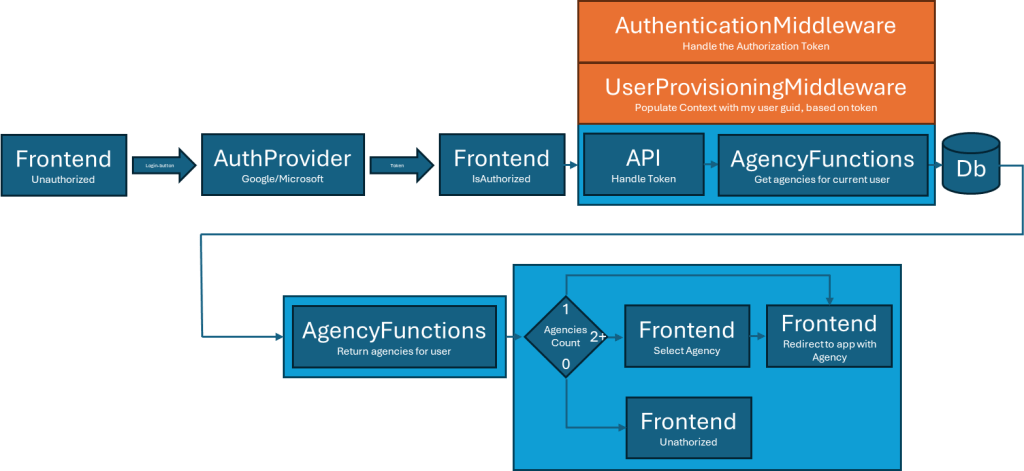
AuthProvier isn’t available, or can’t be reached due to a network problem.
This would cause the login to fail, and stop the user from using the system.
This is detected by our front end getting error messages from the AuthProvider.
Display an error message to the user, telling them this is a temporary error with the AuthProvider, and they can try again soon. Logging is of course key. Also, we’re planning a backup login routine by email (enter email, get temporary password).
Redirection to the authentication endpoint fails.
This would also cause the login to fail, and prevent the user from using the system.
We can detect this only if we get errors on our part, and in that case we can show a meaningful error to the user.
Next up, we have the AuthenticationMiddleware.

AuthProvier isn’t available, or can’t be reached due to a network problem.
This would cause the token validation to fail, and stop the user from using the system.
This is detected by our JwtValidator getting error messages from the AuthProvider.
The AuthProvider is called to get their public key, and caching that public key on our end would make us less vulnerable to short outages. The providers rotate their keys, and we would have to handle that, adding complexity to the application. The benefit would be both performance and resilience.
Let’s also check the UserProvisioningMiddleware.

Database isn’t available, or can’t be reached due to a network problem.
The risk for connection issues with the database is definitely not specific for the UserProvisioningMiddleware, it will occur anywhere we try to connect to a database. When it happens in our UserProvisioningMiddleware, it means we cannot tell what permissions the user has. We will handle this by denying access, but tell the User that this probably is a temporary problem.
It’s also obvious we need monitoring, setting up Azure Application Insights seems like a good choice since we’re already deep in the Azure eco system.
Microsoft Entra ID
Failure Modes:
- Microsoft Entra ID isn’t available or can’t be reached due to a network problem. Redirection to the authentication endpoint fails.
System Impact: User can’t login.
Detection: Authentication middleware catches error
Higher Level Impact: System unusable for user
Mitigation: For now we’ll just trust Microsoft, but in the future we’ll add login by email, as backup, as well for users without Microsoft or Google accounts. - User can’t login.
System Impact: User can’t login.
Detection: Microsoft Entra ID handles this.
Higher Level Impact: System unusable for user
Mitigation: In the future, the backup login by email will be an option
Google Authentication
Failure Modes:
- Google Auth isn’t available or can’t be reached due to a network problem. Redirection to the authentication endpoint fails.
System Impact: User can’t login.
Detection: Authentication middleware catches error
Higher Level Impact: System unusable for user
Mitigation: For now we’ll just trust Google, but in the future we’ll add login by email, as backup, as well for users without Microsoft or Google accounts. - User can’t login.
System Impact: User can’t login.
Detection: Microsoft Entra ID handles this.
Higher Level Impact: System unusable for user
Mitigation: In the future, the backup login by email will be an option
Crawl Container Instance(s)
Failure Modes:
- The Container Instance exits unexpected
System Impact: The crawl session isn’t finished.
Detection: Azure Retry mechanism, and if all retries fails our scheduled Container Management Function detects Container with exit code not equal to 0.
Higher Level Impact: Very inconvenient since the crawl may take hours
Mitigation: Automatic retry on error, after 3 unsuccessful attempts, alert support/dev team, and display an error in the UI - The Container Instance application never finishes
System Impact: The crawl session isn’t finished.
Detection: Scheduled Container Management Function detects running Container Session with no results logged for a set time
Higher Level Impact: Very inconvenient since the crawl may take hours
Mitigation: Automatic retry on error, after 3 unsuccessful attempts, alert support/dev team, and display an error in the UI
Report Generator Container Instance(s)
Failure Modes:
- The Api (app inside container) is unresponsive
System Impact: Reports cannot be generated.
Detection: Client side error handling
Higher Level Impact:
Mitigation: Display an error in the UI, the user can try again. Log this, and figure out a way to restart the container instance - The Container Instance exits unexpected
System Impact: Reports cannot be generated.
Detection: Azure Retry mechanism.
Higher Level Impact:
Mitigation: Automatic retry on error, after 3 unsuccessful attempts, alert support/dev team and display an error in the UI, the user can try again.
Only two days ago I wrote about deciding to rewrite the Report Generator to be an Azure Function rather than a container. Today, I changed my mind.
The issue we want to solve, primarily, is that generating a report takes too long. Secondary we want to get rid of the LibreOffice dependency.
Turns out, the component needed to replace LibreOffice is expensive, like really expensive. The cheap ones starting at around $800 per year, sometimes per developer and/or deployment. The most expensive I’ve looked at is $10000 per year, but that’s all inclusive.
The estimated cost of running a small container instance with what we need, including LibreOffice, is less than $100 per year. We will have to handle the scaling, rather than trust Azure Functions to scale for us.
Having the Report Container(s) always on will solve the time issue. The LibreOffice issue remains. I’d prefer not to depend on LibreOffice, but it’s not that bad, and since the performance are comparable, I find it really hard to motivate the extra cost of buying a component.
The flow for the user will now be something like
- The user clicks a button to generate a report
- The Angular app calls the Api (an Azure Function)
- The Function stores the Crawl Session to a database
- The Session Id is put on a Queue
- A result is returned to the UI so that the user knows the report is being generated
The flow in the container will look like this
- Application starts, and subscribes to the Queue
- A message is put on the queue and the Subscribe event is triggered
- The Session Id is read from the message
- The Session data is loaded from the database
- The Crawler Application is started with relevant parameters
- The Application generates the Report and stores it to a Blob Storage
- The Blob Storage sends an event to an Azure Function that updates the Session Status in the Database
If (when) we need to scale this, we just add another container that subscribes to the Queue. This makes the Queue a single point of failure, and I need to further investigate how to handle this. For short outages, just letting the User know that the job wasn’t queued, or that it failed, should be acceptable. Short in this context is that when the User tries again, it works.
Putting together a multi-tenant cloud application with dependencies to external services and a Windows desktop application isn’t easy. And the cost-tools provided, well let’s just say they’re not really on the spot. One of our resources was listed as “about $6 per month”, but is actually close to 1000 SEK ($95, give or take) per month.
Well, I don’t think doing what we’re doing here would be easy on premise either. And definitely not cheap. I mean, scale and geo-redundancy on self hosted infrastructure sounds like a nightmare.
I’m learning a lot about cloud, or maybe rather Azure. I’m pretty familiar with the concepts of cloud, but choosing the right resources, and configure them for optimal balance of performance and cost is, well confusing.
We have decided to rebuild the report generator to remove unfortunate dependencies (LibreOffice) (Option C), and while doing that we can also run it as an Azure Function rather than a Windows Container resulting in faster execution time (since the Windows Container takes minutes to instantiate), easier scalability and lower cost.
The scalability is because the Azure Function auto scales by default up to 100 instances, while the default limit on Container App Instances is 10. Also, since execution time is seconds instead of minutes, the need for more simultaneous instances is far lower.
We also decided to implement a Queue (Option B) to handle the limitation on Crawl-Container Instances. Execution time on the crawls are not an issue, they are expected to take a long time. However, with a Container Manager, we can handle scaling at a whole different level, distributing instances across regions if necessary.
Time to do a STRIDE threat analysis on the system. STRIDE stands for Spoofing, Tampering, Repudiation, Information disclosure, Denial of service and Elevation of privilege. Let’s talk about them one at a time.
First, let’s look at the application infrastructure. We have an Angular frontend, hosted as a Static Web App in Azure, and we have Azure Functions to host our API endpoints. We have one SQL database to handle the Agencies, Users and their relations. Each Agency has a connection string to an agency database, and to start with, all the Agencies share the same database. There’s also a Container app.
Spoofing
Do we authenticate users, how do we make sure the user is who they say they are, how do we handle their credentials etc.
We use external Identity Providers (Microsoft and Google) to handle our login, using OAuth 2. This means we do not store user credentials. We only store the identifier and the e-mail address. We verify that the token is signed by the provider.
Only the Angular App and the Azure Functions are export outside Azure, and the Angular App contains no sensitive information whatsoever. The OAuth token is the weak link, but at least we use Https, and the token expires after a short while, making it harder to spoof.
Tampering
Our architecture does not include any mechanism to secure against tampering, and that is by choice. We do however always server-side validate, the client cannot be trusted. Having your token, you could call the API with made up values, but since we validate both values and permissions server-side, you can’t really do anything you cannot do in the UI.
Going back to our Stressors (part 1, part 2), there are a few that might change the need of implementing some kind of security.
Repudiation
We do not have any information about who changed something, except in the code base where we use Git. We will probably have to implement some kind of audit log in the future.
Information Disclosure
All our API endpoints require a valid auth token, and the user permission is validated. We only allow communication using https.
The database, and the Blob Storage is only accessible from within Azure, or from our office IP. Users are the dev-team, the CTO of the client and the identities used by the Azure Functions and the Container Instances.
This may leave one way to access the database/storage “unauthorized”. Maybe someone from the dev team could use their personal account from another Azure resource to access them. However, they could still just access them from the office, so I really don’t see the point.
A better solution would be setting up private networks inside Azure, by doing that we could allow access only from services inside our Resource Group(s). This, however, drives a lot of costs. It is something to take into account when we get closer to a public release.
Access to the UI is granted or revoked by an Agency admin. We will have to trust them to protect their data.
Denial of Service
Our architecture doesn’t really protect us against targeted attacks right now. The Static Web App handles load really well, since it only serves static files and is globally distributed. The API uses Azure Functions that scale really well, but could drive cost. We can easily activate geo-redundancy for our Azure Function, but will consider some kind of active-active access across regions as we scale.
The main denial of service concern is the limit on number of reserved vCores, but an improvement suggested here will solve that problem.
Elevation of Privilege
Since we validate the user using the auth token, and check permissions against the database, there are two possible ways of changing your access level. Either gain access to a valid token for a user with more privileges, or change the content of the database. Since the database is guarded by a firewall, and with strict access control (no password that can leak), I’d say the token is our weak spot.
So, identify a user with the privileges you need, hack them to access their token, and you’re good to go.
As for now, we do not handle anything sensitive. If (when) we do, one way to mitigate this risk is to ask the user to authenticate again when trying to access or edit sensitive information.